Lesson 15: Learning the numbers 456
456
Numbers are best learned when associated with the corresponding home row finger. Read the paragraph Finger Positions to avoid retyping due to incorrect fingerings for each number. Keep
F and J fingers on keys — rotate the hand for the number row.No more than 3 errors per line. Retype the line if more than 3 errors occur. Observing your typing errors by you and your teacher is an important step toward learning to type and improving accuracy. Typing errors cannot be corrected using the backspace, delete, or arrow keys.
Finger Positions
 Number
4
is typed
with the
F finger
— Practice
f4 f4 f4 f4 f4 f4 f4 f4 f4 f4 f4 f4 f4 f4 f4 f4 f4
Number
4
is typed
with the
F finger
— Practice
f4 f4 f4 f4 f4 f4 f4 f4 f4 f4 f4 f4 f4 f4 f4 f4 f4
Number 5 is typed with the
F finger
— Practice
f5 f5 f5 f5 f5 f5 f5 f5 f5 f5 f5 f5 f5 f5 f5 f5 f5
Number 6 is typed with the
J finger
— Practice
j6 j6 j6 j6 j6 j6 j6 j6 j6 j6 j6 j6 j6 j6 j6 j6 j6
Practice Procedure
Goal
is
to learn the number row without looking at the
numbers - numeric pad is not to be used
Type
for THREE errors or less
per line — proofread
carefully after a line is typed
Use
correct spacing after all punctuation
Keeping F and J fingers on keys - rotate hands for number row
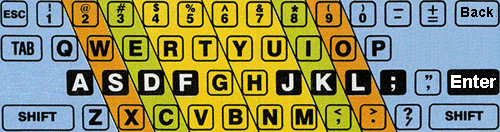
Practice ― Lesson 15 ― 4
56Line numbers are not typed yet. Retype a line if more than 3 errors occur. Strive for ZERO punctuation errors. Keypad is not used.
|
1
frf fr4
f4f 4f4 frf fr5 f5f 5f5 jyj jy6 j6j 6j6 456 654 465
Have your teacher review this lesson with you when finished. |
